
Your sales reps are spending half their week on spreadsheets, CRM cleanup, and chasing cold leads—instead of actually selling. Sound familiar? That’s where a virtual sales assistant comes in.
Whether you’re a founder handling everything yourself or a growing team stretched thin, bringing in dedicated sales support can be a game changer. This guide breaks down exactly what a virtual sales assistant does, what it costs in 2025, and how to hire one without the guesswork.
Key Takeaways
A virtual sales assistant is a remote professional or AI-powered tool dedicated to sales support tasks like lead generation, prospect research, outbound outreach, and CRM management. Their job is simple: handle the admin work so your sales team can focus on closing deals and building relationships with potential customers.
Businesses in 2025 typically save 40–60% compared to in-house hires when using virtual sales assistants. You also gain extended coverage—often 24/7 for AI tools or multi-time-zone for human VAs based in locations like the Philippines, Latin America, or Eastern Europe. One case study showed a $28,000 investment in VSA support generating $340,000 in additional commission revenue over six months.
Common tasks include lead research, prospect qualification, appointment setting, sales pipeline management, and follow ups across email, phone calls, and LinkedIn. These aren’t vague admin tasks—they’re the specific activities that keep your sales funnel healthy and moving.
Costs typically range from $20–$45/hour or $800–$2,500/month, depending on skill level, location, and scope of work. Performance-based models exist too, though they’re less common.
What you’ll learn in this article:
- What a virtual sales assistant actually does (and doesn’t do)
- When it’s the right time to hire one
- Realistic cost breakdowns for 2025
- A step-by-step hiring process that works
What Is a Virtual Sales Assistant?
A virtual sales assistant is a remote contractor you hire to outsource a specific task or set of functions to build a more efficient sales process. A virtual sales assistant is an AI-powered tool designed to perform sales-related tasks efficiently.
A virtual sales assistant is a remote worker—either human or AI-based—dedicated specifically to sales tasks. Unlike a general virtual assistant who might handle calendar management, travel booking, or personal errands for an executive assistant role, a sales virtual assistant focuses entirely on revenue-generating support work.
Human VSAs typically work from locations like the United States, Eastern Europe, the Philippines, or Latin America. They handle lead research, outbound calls, CRM hygiene, and customer outreach. AI virtual sales assistants, on the other hand, might be chatbots, voice agents, or email automation tools that handle repetitive tasks at scale.
The key difference from a general VA? No booking flights for the CEO. No scheduling dentist appointments. A virtual sales assistant’s entire job is supporting your sales process—pipeline maintenance, follow up emails, prospect qualification, and keeping deals moving forward.
A virtual sales assistant focuses specifically on managing non-selling, administrative, and logistical aspects of a sales cycle.
How VSAs Fit Into Modern Sales Teams
In 2025, virtual sales assistants integrate directly into your existing tech stack. They work inside CRMs like HubSpot, Salesforce, or Pipedrive. They use sales enablement tools like Apollo, LinkedIn Sales Navigator, and ZoomInfo for lead generation and data analysis. They follow your existing playbooks, scripts, and qualification frameworks.
Think of them as an extension of your sales team—just without the overhead of a full-time in-office hire.
Typical Use Cases by Company Type
- B2B SaaS startup in San Francisco: Hires a VSA to handle cold outreach via LinkedIn and email, qualify inbound leads, and schedule discovery calls so founders can focus on product demos
- Local home services contractor in Texas: Uses a VSA to respond to inbound leads after hours, follow up on quotes, and verify customer data to reduce lead drop-off
- E-commerce brand selling across US and UK: Employs human VAs plus AI chatbots for 24/7 customer interactions, FAQs, and order inquiries, escalating complex issues to humans—and may even bring on a dedicated e-commerce virtual assistant to manage product listings, inventory, and day-to-day store operations
- Consulting firm expanding to Europe: Uses a VSA to build prospect lists, run outbound outreach, and handle lead qualification across time zones without hiring local reps immediately, similar to how a real estate virtual assistant can take over lead gen and admin for property professionals
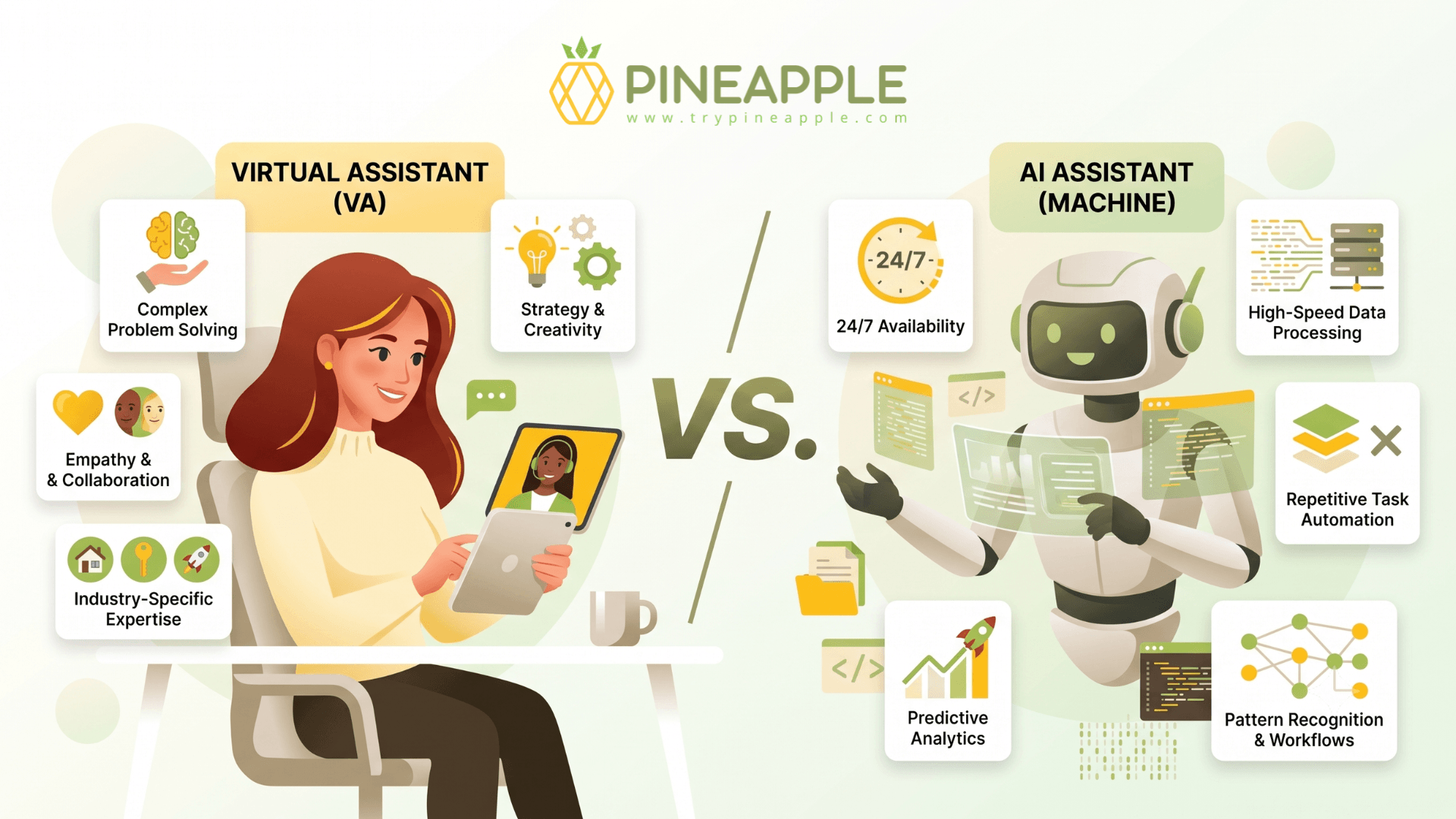
Many businesses combine both human and AI virtual sales assistant services. AI handles instant responses, simple FAQs, and routing. Human VAs manage nuanced conversations, relationship building, and anything requiring judgment. Studies show hybrid approaches deliver 40–60% better conversion rates than either alone.

What Does a Virtual Sales Assistant Do Day-to-Day?
Forget generic task lists. Here’s what actually happens during a typical week with a virtual sales assistant on your team.
Lead Generation Tasks
Your VSA spends significant time researching decision-makers on LinkedIn, building targeted prospect lists based on your ideal customer profile. They verify email addresses, check phone numbers, and enrich data with details like company size, revenue, and tech stack.
Every new contact gets logged into your CRM with proper fields—industry, lead source, campaign tags. No more messy spreadsheets or leads falling through the cracks.
Outbound Outreach Responsibilities
Once lists are built, your VA handles the heavy lifting of sales outreach:
- Sending first-touch emails from your templates
- Making outbound calls to warm leads
- Sending LinkedIn connection requests and messages
- Running basic qualification calls using pre-defined questions (budget, timeline, authority, need)
They follow your scripts, stay on brand, and personalize when appropriate.
Follow-Up and Pipeline Tasks
This is where many sales processes fall apart—and where a VSA shines:
- Updating deal stages in CRM after each interaction
- Scheduling discovery calls for account executives
- Sending reminder emails before demos
- Ensuring no opportunity sits idle for more than 24–48 hours
Consistent follow ups are what separate high-performing sales teams from everyone else.
Admin and Reporting
The less glamorous but equally vital part of the role includes:
- Cleaning duplicate records in CRM systems
- Tagging lost deals with reasons (price, timing, competitor)
- Preparing weekly reports showing meetings booked, response rates, and sales pipeline changes
- Maintaining customer data accuracy
Light Marketing Support
A virtual sales assistant can also handle marketing-adjacent tasks tied to sales:
- Sending nurture sequences to colder leads
- Updating lead source fields after campaigns
- Tracking campaign responses and updating relevant CRM fields
Mini-Scenarios: How It Works in Practice
Scenario 1: Your company collected 200 business cards at a 2024 trade show. They’ve been sitting in a drawer. Your VSA takes that list, researches each contact, qualifies 40 as good fits, runs a targeted outreach sequence, and books 8 discovery calls in Q2 2025. Leads rescued.
Scenario 2: A home services business sees inbound form fills drop during the holiday lulls. The VSA picks up every lead within minutes instead of hours, re-engages previous quotes, and generates business during what was previously dead time.
Why Hire a Virtual Assistant for Sales?
Here’s the core problem: founders and sales reps spend hours each week on data entry, research, manual follow ups, and admin tasks—instead of live sales conversations. That’s valuable time burned on activities that don’t directly generate leads or close deals.
Time Leverage That Actually Works
Let’s do the math. If your sales rep’s time is worth $60–$100/hour when they’re selling, but they spend 10–15 hours per week on non-selling admin work, that’s a massive opportunity cost.
Offload those 10 hours to a VA at $25/hour = $250/week. Meanwhile, your rep reclaims that time for cold calling, demos, and building relationships with customers. The savings compound fast.
Revenue Impact You Can Measure
Speed matters. One documented case showed lead response time dropping from 4.2 hours to 18 minutes after bringing on a VSA. The result? Conversion rate jumped from 1.8% to 4.3%. Meetings per agent nearly doubled.
A small B2B agency that cuts lead response time from 48 hours to under 2 hours can realistically close one extra $3,000/month retainer per quarter. That’s more revenue for a fraction of the cost.
Risk Reduction During Busy Periods
Q4 gets chaotic. Campaigns spike inbound volume. Sales reps get overwhelmed. Deals slip through.
Having dedicated support means consistent follow ups happen even when your team is stretched. No more “I forgot to call them back.” No more customer relationships dying in “Contacted” stage for weeks.
Flexibility Without Full-Time Commitment
Scale hours up for product launches or Black Friday. Scale down during slower months. No expensive severance or empty desks. This flexibility is especially valuable for small businesses testing new markets or running seasonal campaigns.
Onshore vs. Offshore at a Glance
Factor | Onshore (US/Canada/Western Europe) | Offshore (Philippines/Latin America) |
|---|---|---|
Cost | $30–$45/hour | $20–$30/hour |
Language | Native English | Strong English, some accent variance |
Time Zone | Same as your team | Evening/morning overlap possible |
Cultural Fit | High | Moderate |
Best For | Enterprise, high-touch sales | High-volume, cost-sensitive operations |
The right choice depends on your sales cycle complexity, customer expectations, and budget, and tools like a virtual assistant savings calculator can help you quantify whether the numbers make sense for your business.
Signs You’re Ready to Hire a Virtual Sales Assistant
Not sure if now is the right time? Here’s how to diagnose whether you need sales support today—not “someday.”
Missed Follow-Ups Are Costing You Deals
Demos happened last week. Nobody followed up within 24–72 hours. Deals go cold. Inbound form fills from December 2024 are still sitting untouched in January 2025. If this sounds familiar, you’re losing money—and you’re likely experiencing several of the classic signs you’re ready to hire a virtual assistant rather than continuing to do everything yourself.
Your Sales Team Is Drowning in Admin
When sales professionals spend more than 30–40% of their week on spreadsheets, CRM cleanup, and prospect research instead of phone calls and demos, something’s broken. That’s not selling—that’s data entry.
Pipeline Stagnation
Opportunities sitting in “Contacted” or “Proposal Sent” for weeks with no scheduled next step? That’s a capacity problem, not a sales skill problem.
Growth Triggers
Watch for these specific moments:
- Moving from solo founder-led sales to a small team
- Launching in a new region (expanding to Europe in mid-2025)
- Increasing ad spend driving more inbound leads than you can handle
- Longer sales cycles requiring more touchpoints
If any of these patterns have persisted for 4–6 weeks, it’s time to explore hiring a part-time or full-time virtual sales assistant and take advantage of the broader benefits of hiring a virtual assistant for your business.

Virtual Sales Assistant Costs in 2025
Let’s talk real numbers—not vague “it depends” answers.
Hourly Rates by Region
For broader context, it helps to understand how much hiring a virtual assistant costs in 2024 across different models and providers.
Location | Skill Level | Typical Hourly Rate |
|---|---|---|
Philippines | Entry-Mid | $20–$25/hour |
Latin America | Entry-Mid | $22–$30/hour |
Eastern Europe | Mid-Senior | $25–$35/hour |
US/Canada | Mid-Senior | $35–$45/hour |
Western Europe | Mid-Senior | $30–$45/hour |
Monthly Package Pricing
- Part-time (20 hours/week): $800–$1,200/month for offshore, $1,200–$1,800/month for onshore
- Full-time (40 hours/week): $1,500–$2,500/month for standard roles, up to $3,500+ for senior or specialized positions
Performance-Based Models
Some arrangements include per-qualified-lead fees or bonuses for meetings that convert to opportunities. These are less common but can work well for outbound-heavy roles where output is easily measured.
What Drives Costs Up or Down
- Niche expertise: B2B SaaS sales support costs more than general admin
- Seniority: Junior VAs vs. experienced SDR-type assistants
- Language requirements: Native English or multilingual capabilities
- Tools experience: Salesforce admin skills, Power BI reporting, or advanced CRM systems
Hidden Costs to Budget For
- Onboarding time: Plan for 2–4 hours of initial training plus 1–2 weeks of close supervision
- Software subscriptions: Additional CRM seats, dialer tools, email warmup services, LinkedIn Sales Navigator
- Management overhead: Your time reviewing work and providing feedback
The ROI Reality Check
If a $1,500/month assistant helps close just one extra $5,000 deal per quarter, the role pays for itself with room to spare. One documented case showed 1,114% ROI—a $28,000 investment generating $340,000 in additional revenue over six months.
How to Hire a Virtual Sales Assistant Step by Step
Here’s a practical checklist for first-time hirers, from defining tasks through running a trial period.
Step 1: Define What You’re Delegating
List every sales task currently done by founders or reps:
- Lead research
- Outbound emails
- CRM updates
- Reporting
- Follow-up calls
Mark each task as “can delegate” or “must stay with existing staff.” This becomes your job description foundation.
Step 2: Create a Clear Role Description
You can speed this up by using a structured virtual assistant hiring guide to clarify responsibilities and expectations before you post the role.
Be specific about daily and weekly outputs:
- 50–80 outbound emails per day
- 10–20 outbound calls
- 10–15 new contacts researched
- CRM fully updated by end of day
- Weekly report delivered every Friday
Vague expectations lead to disappointing results.
Step 3: Choose Your Engagement Model
Some businesses prefer to work with a managed business virtual assistant service that provides vetted talent, tools, and oversight instead of sourcing and managing freelancers alone.
Model | Pros | Cons |
|---|---|---|
Freelancer (Upwork, etc.) | Lower cost, flexible | More management required |
Agency placement | Vetted candidates, some oversight | Higher cost |
Managed VA service | Hands-off, replacement guarantees | Premium pricing |
Direct hire (job boards) | Maximum control | Full management burden |
Step 4: Screen Candidates Properly
Don’t just review resumes. Use:
- Work samples: Have them research 20 prospects in your target market
- Written English test: Evaluate communication quality
- Role-play: Simulate a qualification call to assess sales mindset
Step 5: Run a Paid Trial Period
Start with a 2–4 week paid trial on a clearly defined project:
- Clean up a specific CRM segment
- Book meetings from a warm lead list
- Research and qualify a new prospect batch
This tests consistency, responsiveness, and quality before full commitment.
Step 6: Onboard and Integrate
Provide everything they need to hit the ground running:
- Playbooks and scripts
- Email and call templates
- CRM access with appropriate permissions
- Clear KPIs (meetings booked per week, contact attempts per lead, data accuracy)
Set them up for success from day one.
Document Learnings Early
Use the first 30–60 days to refine the role. What’s working? What needs adjustment? Document everything. This sets you up to expand hours or bring on additional support later.

Best Practices for Working With a Virtual Sales Assistant
Establish Communication Rhythms
First month: Daily 10–15 minute stand-ups via Zoom or Google Meet. Review yesterday’s work, clarify today’s priorities, address blockers quickly.
After ramp-up: Shift to 2–3 check-ins per week once your assistant is fully effective. Keep communication frequent but efficient.
Create Clear, Written SOPs
Don’t assume anything is obvious. Document:
- One-page checklist for qualifying inbound leads
- Email templates for first outreach, follow-ups, and re-engagement
- Step-by-step guides for moving deals between CRM stages
- Escalation procedures for complex situations
Set Up Proper Tools and Access
Your assistant needs:
- Dedicated CRM access with role-based permissions
- Email account for outreach
- Dialer or phone system for outbound calls
- LinkedIn Sales Navigator (if applicable)
- Basic training on how your sales pipeline stages work
Track Metrics That Matter
Build a simple weekly dashboard covering the core KPIs you’ll use to monitor your virtual assistant’s productivity:
- New leads added
- Touches per lead
- Meetings set
- Show-up rate
- Conversion from lead to opportunity
What gets measured gets improved.
Prioritize Data Security
- Use NDAs for any contractor or independent contractor
- Limit access to only necessary systems
- Enforce strong passwords and two-factor authentication
- Follow GDPR requirements for EU customer data
- Review access permissions quarterly
Conduct Regular Performance Reviews
Every 30–90 days, review performance and adjust:
- Are KPIs being met?
- What tasks should be added or removed?
- What training or upskilling would help?
- Is it time to increase hours?
Treat your virtual sales assistant as a vital part of your team—because they are.
FAQ
How long does it take for a virtual sales assistant to become fully effective?
Most assistants need 1–2 weeks to learn your products, tools, and scripts. Expect around 4–6 weeks before they consistently hit agreed KPIs like meetings booked or qualified leads delivered. Basic tasks like data entry and simple customer outreach can start within the first few days. Complex B2B sales cycles or technical products may require a slightly longer ramp.
Should I start with a part-time or full-time virtual sales assistant?
Many business owners and smaller teams begin with 10–20 hours per week to validate the role and iron out processes. Once you see consistent results—meetings booked, leads qualified, improved customer engagement—scale up to full-time. If you already have a large active pipeline and clear documentation, jumping directly to full-time can accelerate results and free up senior sellers faster.
How do I measure whether my virtual sales assistant is successful?
Track a small set of core metrics: new leads added, contact attempts per lead, meetings booked, show-up rate, and opportunities created. Qualitative indicators matter too—cleaner CRM data, shorter lead response times, positive feedback from sales professionals, and improved customer satisfaction. If reps have more time selling and your sales funnel is moving faster, the role is working.
What’s the difference between a human virtual sales assistant and an AI assistant?
A human VA handles nuanced conversations, multi-step tasks, and judgment calls. They’re better at building relationships with customers and navigating complex objections. AI assistants excel at instant responses, simple FAQs, and basic routing around the clock—plus they handle repetitive tasks at scale without fatigue. Most businesses combine both: AI for initial contact and simple qualification, human VAs for deeper outreach and relationship building.
Can I move sales tasks from an existing rep to a virtual sales assistant without disruption?
Absolutely. Start by documenting current processes and exporting existing lead lists. Run a 1–2 week overlap where the rep and VA work together on the same accounts. Begin with low-risk tasks like data cleanup and follow-up on older leads, then gradually hand over more active customer outreach as confidence grows. Clear playbooks and regular check-ins during transition prevent things from falling through the cracks.